
- Home
- Tips & Guides
- Why one room in your house has terrible Wi-Fi
Why one room in your house has terrible Wi-Fi
It's almost never a faulty modem. Router placement, building materials and the mesh question, explained without the jargon.
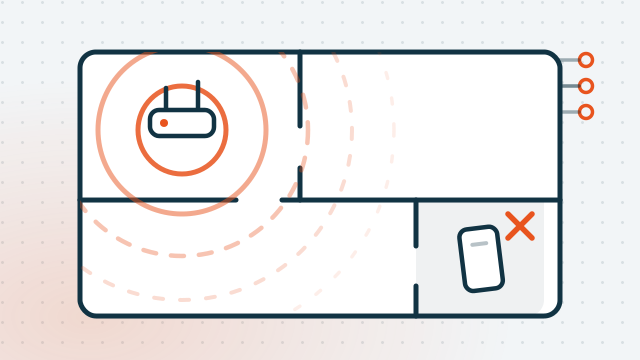
Almost everyone has that one room. The back bedroom, the granny flat, the corner of the house where video calls fall apart. It is very rarely a broken modem, and it's very rarely fixed by buying a bigger one.
1. It's distance and walls, not a faulty modem
Wi-Fi is radio. Signal strength drops off sharply with distance, and every wall it passes through takes another bite out of it. A modem sitting in the corner of the house is spending half its signal on the neighbour's yard.
So the dead room usually isn't a fault. It's geometry.
2. What actually blocks a signal
Not all walls are equal. Roughly worst to best:
- Metal and foil. Foil-backed insulation, metal studs, filing cabinets, fridges, and the foil-lined sarking in a lot of Australian roofs. Metal doesn't attenuate a signal so much as reflect it.
- Concrete and brick. Standard in units and lower floors. Double brick is brutal.
- Water. Fish tanks, hot water systems, and — genuinely — a room full of people.
- Mirrors and low-E glass. Both have a metallic coating. Modern energy-efficient windows are surprisingly effective at blocking Wi-Fi.
- Timber and plasterboard. Mostly fine. This is why an older Queenslander often has better Wi-Fi than a newer unit.
If the dead room is on the other side of the kitchen, or under a foil-insulated roof, you've probably just found your answer.
3. Where the modem should live
The ideal spot is central, high, and in the open. The usual spot is in a cupboard by the front door, behind a television, next to the fridge, because that's where the phone socket is.
What helps, in order of how much difference it makes:
- Move it out of the cupboard or cabinet. Enclosed spaces cost you a lot.
- Get it off the floor — waist height or above.
- Move it away from the fridge, the microwave and the TV.
- Move it towards the middle of the house, even by a couple of metres.
- Leave the antennas alone unless you have three or more — and if you do, try one vertical and one horizontal.
You are usually not stuck with the socket. On NBN FTTP, HFC and Fixed Wireless the modem plugs into a box that's already fixed in place — but a longer ethernet cable to a better-placed router is cheap and dramatic. On FTTN and FTTC the modem does have to stay near the phone socket, and that's when mesh becomes the answer.
4. 2.4GHz and 5GHz, explained simply
Your router broadcasts on two frequencies at once, and they behave very differently:
- 2.4GHz — slower, but travels further and gets through walls better. Crowded, because every neighbour, every baby monitor and every microwave is on it too.
- 5GHz — much faster, but doesn't travel as far and is stopped more easily by walls.
A phone next to the router should use 5GHz. A phone in the back bedroom is often better off on 2.4GHz — slower on paper, but a slow connection that holds beats a fast one that drops.
Most modern routers put both under a single network name and decide for you. That mostly works, and occasionally works badly — devices "stick" to a distant 5GHz signal instead of switching. If one particular device is always the problem, that's often why.
5. Extender or mesh?
An extender (or "repeater") rebroadcasts the signal it receives. It's cheap. Two catches: it roughly halves the speed of anything connected through it, and it usually creates a second network name you have to switch to by hand.
A mesh system is two or three units that work together as one network, with one name. Your phone moves between them without you noticing. It costs more, and for a house with a genuine dead zone it's almost always the right answer.
An ethernet cable beats both, every time, for anything that doesn't move — a desktop, a smart TV, a games console, a work-from-home setup. It is unglamorous and it always works.
Buy in that order: cable what you can, then mesh, then extenders as a last resort.
6. Four free tests before you spend anything
- Speed test next to the router, then in the bad room. If it's fast at the router and slow in the room, it's a coverage problem. If it's slow in both, it's the connection, not the Wi-Fi.
- Test on a cable. Plug a laptop straight into the router. That's what your connection can actually do.
- Restart properly. Power off the modem for a full 30 seconds. It fixes more than it should.
- Check what else is running. A single device backing itself up to the cloud can flatten a connection for everyone else.
7. When it isn't the Wi-Fi at all
If everything is slow everywhere, including on a cable, the Wi-Fi isn't your problem — your internet connection is. That's a conversation with your provider about your plan, your technology type, or a fault on the line.
Evening slowdowns specifically usually mean congestion rather than a fault. A connection that's fine at 10am and unusable at 8pm is a capacity issue, and no amount of new hardware fixes it.
If you'd rather someone just worked out which of these it is, that's exactly what our Wi-Fi & network setup visits are for — we test it properly rather than guessing, and we don't sell you equipment you don't need.
More guides

How to spot a scam email before you click
The four things nearly every fake invoice and “your account is suspended” email has in common — and the 10-second check that catches most of them.
Read the guide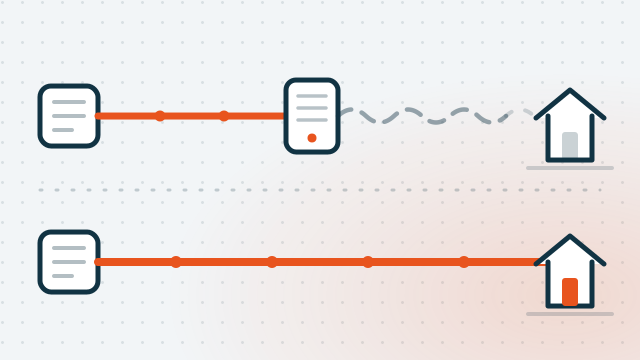
The free fibre upgrade most Brisbane homes haven't claimed
The September 2025 nbn speed jump only reached fibre and cable. How to find out what you're actually on, and how to get fibre run to your door for nothing.
Read the guideRelated questions
Will a better router fix my dead zone?
Is mesh Wi-Fi worth it?
Can you set this up for me?

Rather not deal with it yourself?
Call and describe what's going on — we'll tell you honestly whether it needs a visit or can be sorted remotely today.