
- Home
- Tips & Guides
- The free fibre upgrade most Brisbane homes haven't claimed
The free fibre upgrade most Brisbane homes haven't claimed
The September 2025 nbn speed jump only reached fibre and cable. How to find out what you're actually on, and how to get fibre run to your door for nothing.
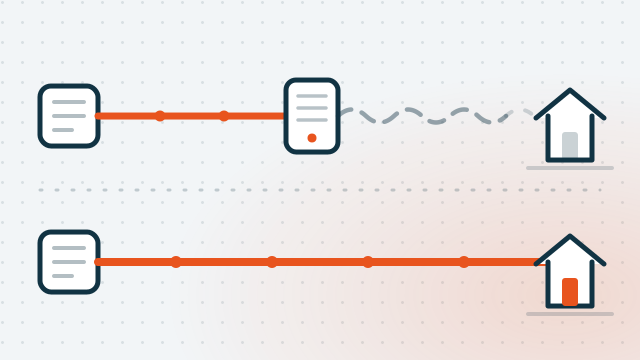
If your internet feels slower than it should, the most useful thing to find out isn't which plan you're paying for. It's which technology runs into your house. That single fact decides what speeds you can buy, whether the big upgrade in 2025 ever reached you, and whether you can have fibre run to your door for nothing.
Two changes in the last year have made this worth ten minutes of anyone's time. Here's the plain version.
1. First, find out what you're actually connected to
There are five fixed-line technologies on the nbn, and they are not equal:
- FTTP — Fibre to the Premises. Fibre all the way into the house. The good one.
- HFC — the old pay-TV cable. Nearly as good.
- FTTC — Fibre to the Curb. Fibre to the pit outside your place, then copper for the last few metres.
- FTTN — Fibre to the Node. Fibre to a cabinet somewhere in your street, then copper for anywhere up to a kilometre. The further you are from that cabinet, the slower you are.
- FTTB — Fibre to the Building, for apartment blocks. Copper up through the risers.
To check yours, put your address into the checker on nbnco.com.au. It will tell you your technology and whether an upgrade is available. You can often tell by looking, too: if there's a white nbn connection box screwed to an internal wall with a power adaptor, you're on fibre or cable already. If your modem plugs into an ordinary telephone socket, you're on copper for the last stretch. Plenty of Brisbane's established suburbs — the older parts of Nundah, Clayfield, Chermside, The Gap — are still sitting on FTTN.
2. The speed jump that skipped half the country
On 14 September 2025, nbn made its three top residential tiers dramatically faster at no extra wholesale cost:
| Tier | Was | Now |
|---|---|---|
| Home Fast | 100/20 | 500/50 |
| Home Superfast | 250/25 | 750/50 |
| Home Ultrafast | 1000/50 | 1000/100 |
| Home Hyperfast (new) | — | 2000/200 |
Ultrafast is the odd one out — its download didn't move, only its upload doubled. The big jump is Home Fast, which went from 100Mbps to 500Mbps for what is usually a very similar price.
Those are nbn's wholesale names. Your provider will sell them to you as something like “NBN 500” or “Ultrafast”, and the two numbers are download and upload in megabits per second — so 500/50 means 500 down, 50 up.
Read the fine print, though: those tiers are only available on FTTP and HFC. If you're on FTTN, FTTC or FTTB, none of it reached you. You didn't get a slower connection — you just watched everyone else get a much faster one.
The gap is measurable. The ACCC spent eight years testing real household connections under its Measuring Broadband Australia programme, and published the final report in June 2026. Across all fixed-line services, plans delivered 99.4% of their advertised download speed in the busy evening period, and the share of services classed as underperforming had fallen to 5.6%, down from 13.9% in 2018. Good news overall — but the ACCC is blunt about where the remaining underperformance sits: FTTN has accounted for most of it throughout the programme.
That isn't something your provider can fix for you, because the limit is the length and condition of the copper between you and the node. It's a physical problem with a physical solution.
3. If you're on FTTN, the fibre upgrade is free
This is the part most people don't realise. nbn will run fibre from the street into your house and install the equipment at no charge for the work itself. You don't pay a technician, and you don't pay for the fibre.
The condition is that you order a plan on the Home Fast tier — the 500Mbps one — from a retail provider. That's it. You ring your provider (or a new one), ask for the fibre upgrade, and pick an eligible plan. Most providers have their own eligibility checker too, and it's worth trying two or three — they draw on the same nbn data but don't all present it the same way.
The one thing to check before you sign: ask what happens if you drop to a cheaper plan later. Several providers charge a fee, commonly around $200, if you downgrade below the qualifying speed or leave within the first 12 months. It's not hidden, but it isn't volunteered either. Ask the question while you're on the phone.
4. On Fibre to the Curb? It just got much easier
Until recently, FTTC customers had to be on a 100/40 plan or better to qualify for a fibre upgrade. From 1 July 2026 that requirement was removed entirely. All 860,000 premises in the FTTC footprint can now request full fibre on whatever speed plan suits them — including the cheap ones.
If you're on FTTC, there is now no real reason to wait. You can move to fibre without being pushed onto a more expensive plan to get it. Call your provider and ask for the upgrade.
5. The copper is going anyway
Around 622,000 homes and businesses are still on FTTN, and nbn has committed to upgrading them by the end of 2030, backed by up to $3 billion in federal funding and more than $800 million of its own. Existing copper services get disconnected at a future date once fibre is available.
You'll get plenty of notice — nbn tells providers at least 18 months ahead of a disconnection. But it does mean the question isn't really whether you move to fibre. It's whether you do it now, on a day you chose, or later on a deadline someone else set.
6. What install day actually looks like
Nothing dramatic, but block out the morning:
- Sometimes a technician visits first to look at the site and work out the cable route. Under an hour.
- The install itself takes about three to four hours. Someone over 18 has to be home for all of it.
- You end up with two new boxes — a small one outside where the fibre enters, and a connection box on an internal wall near a power point.
- The fibre is built alongside your existing connection, so you're not without internet in the meantime. The old service is disconnected once the new one is working.
Renting? You need the owner's permission before nbn will do the work. Ask early — it's the step that holds most upgrades up, and most landlords say yes, because it's a free infrastructure improvement to their property.
7. Be honest about the speed you need
Here's something the industry finds baffling and we find quite sensible: by the end of 2025, only about 2.7 million of the 8.6 million active nbn connections had moved onto a 500Mbps-or-faster plan. Most households looked at the price and decided they were fine.
They're often right. Netflix asks for 15Mbps per 4K stream. A video call uses a few. A family of four all streaming at once, with someone working from home, still fits comfortably inside 100Mbps. Speed is not what makes a connection feel good — consistency is, which is exactly what fibre gives you and a long copper run doesn't.
Where the faster tiers genuinely earn their keep is upload. Going from 20 to 50Mbps up is a real, felt difference if you work from home, run cloud backups, upload video, or have several people on video calls at once. That's the number worth looking at, not the headline download figure.
Our usual advice: take the free fibre upgrade, because the connection underneath genuinely gets better. Then, after twelve months, decide honestly whether the faster plan earned its price. Plenty of households step back down to 100 and never notice the difference — on fibre, 100Mbps is a rock-solid 100Mbps, which is not something copper could ever promise.
8. Three things that will still slow you down
Fibre to the front door doesn't help if the last ten metres let you down. In the order we see them:
- The modem you've had for years. Older routers have 100Mbps network ports, which physically cannot pass a 500Mbps connection no matter what you pay for. Check the ports say gigabit.
- The Wi-Fi generation. An older Wi-Fi 5 router realistically delivers a few hundred Mbps to a nearby device and much less across the house. If you buy 1000 and run it through a 2018 router, you've bought a number, not a result.
- The device in your hand. An older laptop or tablet has its own ceiling. Test with a cable into a modern computer before you conclude the connection is at fault — that one test separates a line problem from a Wi-Fi problem in about a minute.
If the whole house is slow on a cable, it's the connection. If it's only slow on Wi-Fi, or only in one room, that's a different job — and we've written about why one room always has terrible Wi-Fi.
9. The bit nobody mentions: blackouts and alarms
On fibre, the connection box needs mains power. In a blackout, your internet and any phone service running through it stop, unless you've specifically asked your provider for a battery backup — it's optional, it isn't fitted by default, and it lasts around five hours.
This matters if someone in the house relies on a medical alarm, or you have a monitored security alarm or a back-to-base system. Some of that equipment doesn't work on the nbn at all, and some needs reconfiguring. Ring the alarm provider before the install, not after. Keep a charged mobile as the fallback either way.
None of this is a reason to stay on copper — copper stops in a blackout too. It's just worth sorting out on your terms rather than discovering it during a storm.
Want someone to just handle it?
We do this constantly: work out what you're on, tell you whether an upgrade is worth it, sit through the provider phone call, then set the new modem up properly on install day so the Wi-Fi is actually better afterwards. We don't sell internet plans and we're not on commission from anyone, so the advice is just advice. Have a look at our Wi-Fi & network setup service, or call and describe your situation.
More guides
Why one room in your house has terrible Wi-Fi
It's almost never a faulty modem. Router placement, building materials and the mesh question, explained without the jargon.
Read the guide
The 20-minute backup that saves your photos
What to back up, where to put it, and how to check it's actually working — because a backup you've never tested isn't a backup.
Read the guideRelated questions
How do I find out what nbn technology I'm on?
Is the fibre upgrade really free?
Will I need a new modem?

Not sure what you're on?
Call and give us your address — we'll tell you what you've got, whether a free upgrade is available, and whether it's worth your while.